BitBrowser Review – Complete Anti-Detect Browser Analysis
Looking for reliable anti-detect browser solutions? It’s honestly a nightmare these days. Most anti detect browser providers will promise you seamless multiple account management, then deliver fingerprint detection that makes your accounts get flagged faster than you can say “browser automation.” Been there, done that, got the banned account notifications to prove it. So yeah, when someone mentioned BitBrowser, I wasn’t exactly jumping up and down with excitement.
I’ve been using BitBrowser.net for my anti-detect browser needs for the past 8 months and I have to admit they’re doing something right. They’re not the most flashy name out there but sometimes that’s a good thing. Less marketing fluff, more actual performance when it comes to browser fingerprint management.
What they do is pretty straightforward – comprehensive anti detect browser solutions with multiple account management, browser automation, and fingerprint customization. No fancy explanations which I appreciate. They offer over 30 customizable fingerprint settings with team collaboration features. I tested their browser profiles from multiple scenarios and yeah, the anti-detection actually works as advertised.
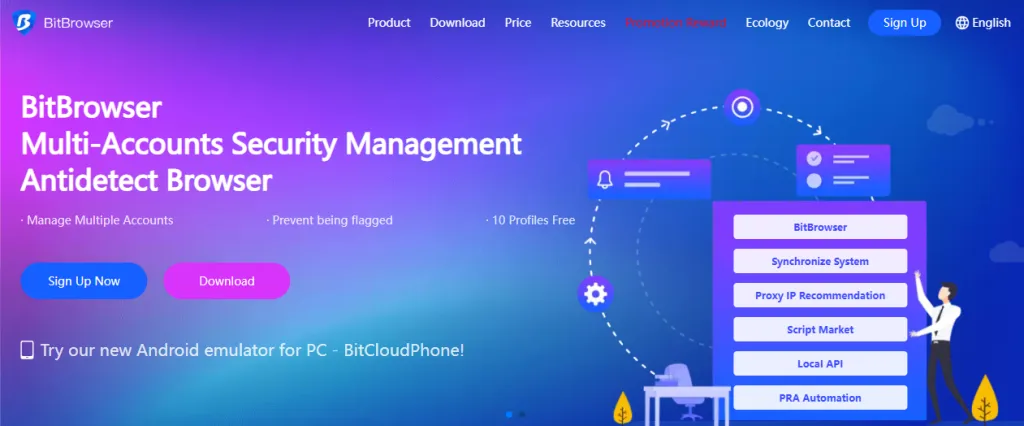
The setup isn’t complicated either. You can go with their free plan that includes 10 profiles if you want to test the waters, or upgrade to paid plans for serious multi-account operations. Depends on what you’re doing really. I’ve used it for social media management, e-commerce operations, and market research. Does the job without making me want to pull my hair out when platforms start detecting automation.
Why Choose BitBrowser for Your Anti-Detect Needs
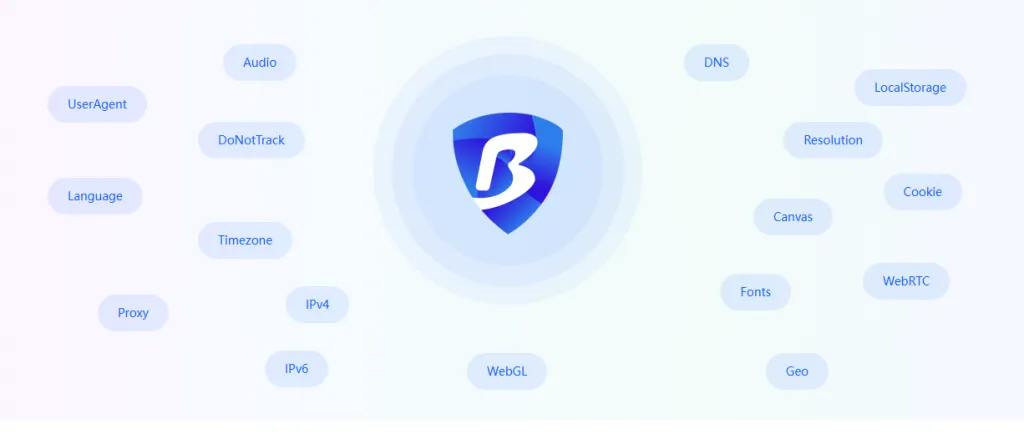
30+ Fingerprint Settings
Comprehensive browser fingerprint customization including UserAgent, Canvas, WebGL, Fonts, and timezone settings for ultimate detection prevention.
Free 10 Profiles
Start with 10 free browser profiles to test the platform’s capabilities with no financial commitment required.
RPA Automation
Advanced browser automation with built-in RPA tools, API integration, and script marketplace for streamlined workflows.
Team Collaboration
Seamless team management with permission assignment, profile sharing, and collaborative workspace for business operations.
Cross-Platform Support
Available for Windows and Mac with Android emulator capabilities through BitCloudPhone integration.
Proxy Integration
Native support for HTTP, HTTPS, and SOCKS5 proxies with automatic IP matching and built-in proxy recommendations.
The best part of BitBrowser is the comprehensive feature set that covers both beginners and enterprise-level clients. It integrates seamlessly with popular automation tools and maintains strict privacy standards through advanced fingerprint management. Users love the intuitive dashboard interface that makes multiple account management a breeze, with real-time statistics and detailed browser profile configurations.
Base Plan
Free Plan
Enterprise
When it comes to pricing BitBrowser makes sense compared to others out there, especially since you get comprehensive anti-detect capabilities with team collaboration features. They don’t play the hidden fee game that drives me crazy with other anti detect browser providers – you know, those surprise charges that pop up later for things like additional profiles or premium features. What you see is what you pay, makes budgeting so much easier for your operations.
This is great if your browser usage goes up and down throughout the month since you won’t get hit with surprise charges when things get busy. I’ve dealt with anti-detect browser providers before where a profile surge meant a nasty bill at the end of the month. With their transparent approach you can actually plan ahead without worrying about unexpected costs eating into your budget.
| Provider | Starting Price | Free Profiles | Fingerprint Settings | Team Support | Automation |
|---|---|---|---|---|---|
| BitBrowser | Free Forever | 10 Profiles | 30+ Settings | ✓ Full Support | ✓ RPA + API |
| AdsPower | $5.4/month | 2 Profiles | 20+ Settings | ✓ Limited | ✓ Basic |
| Multilogin | $99/month | 0 Profiles | 25+ Settings | ✓ Full Support | ✓ Advanced |
| GoLogin | $24/month | 3 Profiles | 15+ Settings | ✓ Limited | ✗ None |
| Dolphin Anty | $89/month | 10 Profiles | 20+ Settings | ✓ Basic | ✓ Limited |
One thing that really stands out about BitBrowser is their customer support – and I’m not just saying that because that’s what you’re supposed to say about anti detect browser providers. Their help desk actually responds quickly and doesn’t make you feel like an idiot when you ask how to configure browser fingerprints or how to set up team permissions. I’ve dealt with support teams before where you can tell they’re just reading from a script, but these guys seem to actually know what they’re talking about.
Whether you’re setting up basic browser profiles or wrestling with some complicated RPA automation that’s got your head spinning, their support team can walk you through it. That’s not always a given in the anti-detect world – plenty of companies will help you with the simple stuff but leave you hanging when things get technical. The fact that they can handle both ends of the spectrum means you’re actually getting value from the money you’re spending on browser services instead of having to hire someone else to figure out the tricky parts.
| BitBrowser Comprehensive Support | ||
| Instant Setup Get started immediately One-Click Profiles Configure anti-detect settings in minutes 24/7 Expert Support Professional technical assistance WhatsApp & Telegram Real experts who understand fingerprinting Script Marketplace Extensive automation library Custom Scripts Ready-made solutions for common tasks |
What I like about BitBrowser is how they handle different types of multi-account management needs and applications. Whether you’re managing social media accounts, running e-commerce stores, or doing market research that requires multiple browser identities, their anti-detect technology doesn’t break a sweat. I’ve seen browser providers that work fine for basic tasks but fall apart when you try to do anything sophisticated.
People using their service mention excellent performance even when they’re running resource-heavy operations – the kind of stuff that would make other anti detect browser providers slow to a crawl. What really stands out is how they maintain stable browser fingerprints no matter which profiles you’re running simultaneously. That’s not always the case with browser companies that have multiple configurations – sometimes you get lucky with settings, sometimes you don’t.
The reason this all works is because of how they’ve developed their fingerprint technology and the fact that they actually invest in keeping their anti-detection methods updated. Too many anti detect browser companies set up their system once and then just coast on it for years. BitBrowser seems to get that browser detection moves fast and if you want to stay competitive with the most effective anti-detect browser you have to keep improving what you offer.
What Our Users Say
As a beginner, BitBrowser wasn’t easy to understand at first, but their customer service team’s support was incredible. They helped me go from someone who couldn’t even use proxy IPs to managing a complete marketing team.
There’s tons of daily work managing accounts. The three best functions are batch browser import, automatic proxy IP matching, and automation features. They reduce labor costs and bring tremendous business growth.
I learned about BitBrowser through a friend’s recommendation. It effectively addresses many e-commerce challenges like store management and advertising placement. The account association issue that plagued us for years is finally resolved!
The anti-detection technology is impressive – we can manage dozens of store accounts without triggering platform suspensions. The team collaboration features make it easy to assign different permissions to our staff members.
After looking at everything they offer I’d say they’ve managed to hit that sweet spot that’s surprisingly hard to find in anti-detect browser services – excellent performance without breaking the bank, and reliability you can actually count on. Their feature set covers what most people actually need for social media management, e-commerce operations, and digital marketing, and their support team doesn’t make you want to pull your hair out when something goes wrong.
The transparent pricing is honestly refreshing in an industry that loves to play games with feature limitations and hidden fees. Whether you’re running a business operation or just need reliable anti-detect capabilities for a personal project, they seem to have figured out how to deliver consistent value without the usual browser provider nonsense.
What gives me confidence in recommending them is their track record with fingerprint protection and the fact they’re actively expanding their automation capabilities. That tells me they’re not just coasting on what they built years ago – they’re actually investing in staying competitive and meeting what people need today. In an anti detect browser market full of companies that overpromise and underdeliver, BitBrowser appears to be one of the few that actually does what they say they’ll do and does it well.
BITBROWSER ANALYSIS
Advantages
Considerations
Frequently Asked Questions
BitBrowser offers comprehensive anti-detect capabilities with 30+ customizable fingerprint settings, including Canvas, WebGL, UserAgent, timezone, and geolocation. It provides 10 free browser profiles forever, advanced RPA automation, team collaboration features, and professional 24/7 support. The platform successfully protects over 100 million accounts worldwide.
Yes, BitBrowser offers a completely free forever plan with 10 browser profiles, 1 team member, and 50 daily openings. Paid plans start at $10/month for 50 profiles and 2 team members. There are no hidden fees, and you can upgrade or downgrade anytime. Enterprise plans support up to 300,000+ profiles with custom pricing.
Absolutely. BitBrowser is specifically designed for multiple account management across social media platforms, e-commerce stores, advertising accounts, and more. The advanced fingerprint technology prevents account association and bans, while team collaboration features allow safe delegation of account management to staff members.
BitBrowser includes built-in RPA automation tools, Local API access, and a comprehensive script marketplace. You can automate repetitive tasks, create custom workflows, and use pre-built scripts from the community. The platform provides detailed documentation and tutorials to help you get started with browser automation.
BitBrowser has native support for HTTP, HTTPS, and SOCKS5 proxies with automatic IP matching capabilities. It includes built-in proxy recommendations and works seamlessly with all major proxy providers. The software is available for Windows and Mac, with Android emulator capabilities through BitCloudPhone integration.
BitBrowser prioritizes security with advanced browser fingerprint isolation, encrypted data storage, and secure profile sharing. Each browser profile operates independently with unique fingerprints, preventing cross-contamination. The platform includes security locks, permission management, and data backup features to protect your valuable accounts and information.
BitBrowser offers professional 24/7 customer support through WhatsApp, Telegram, and email. Their support team consists of technical experts who understand anti-detect technology and can help with setup, troubleshooting, and advanced configurations. They also provide comprehensive documentation, tutorials, and community resources.
Yes, BitBrowser offers a forever-free plan with 10 profiles that you can use indefinitely to test all core features. This allows you to fully evaluate the anti-detect capabilities, fingerprint customization, and team collaboration features before deciding on a paid upgrade. No credit card required for the free plan.