

How to Set Up Proxy Chains for Complete Beginners (2025 Guide)
Setting up proxy chains sounds like something only hardcore tech experts do, right? That’s what I thought too. After spending way too many hours reading overly technical documentation that made my brain hurt, I finally figured out that proxy chaining isn’t actually that complicated – it’s just that nobody explains it in plain English. So here’s the guide I wish I had when I started.
Proxy Chains Setup Guide
What You’ll Need:
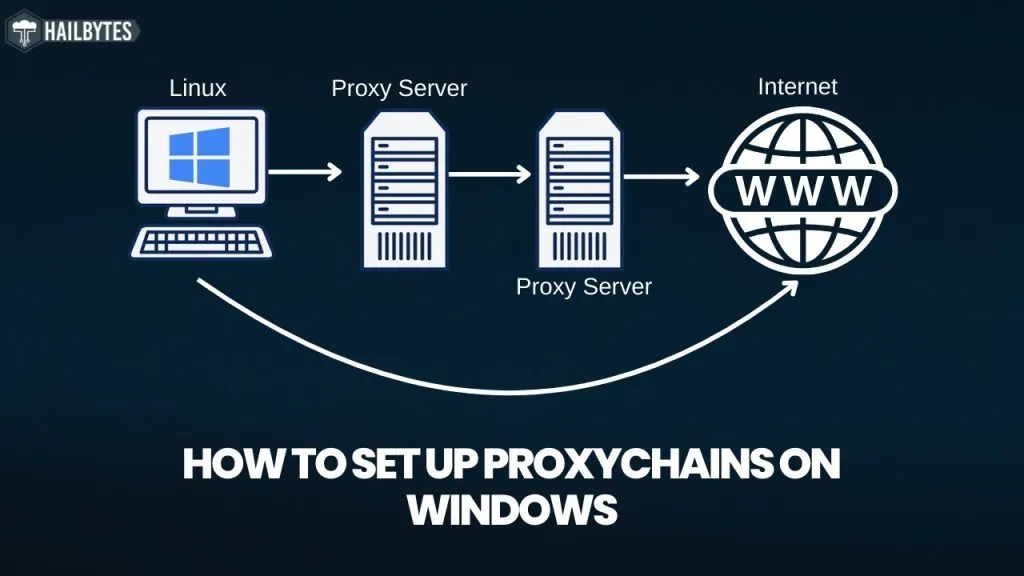
I’ve been using proxy chains for about two years now, and honestly, once you understand the basics, it’s like riding a bike. You might wobble at first, but then it clicks. A proxy chain is basically connecting multiple proxy servers in a sequence – your traffic bounces through each one before reaching its destination. Think of it like taking multiple connecting flights instead of a direct route, except for your internet traffic.
Why would anyone want to do this? Well, it’s about adding layers of privacy and security. Each proxy in the chain only knows about the one before and after it, not the complete route. It’s like passing a secret note through several people – each person only knows who gave it to them and who they’re passing it to, not the original sender or final recipient. Pretty clever when you think about it.
Understanding Proxy Chains: The Basics
What Are Proxy Chains?
Multiple proxy servers connected in sequence, routing your traffic through each one for enhanced privacy and anonymity.
How They Work
Your request travels through Proxy 1 → Proxy 2 → Proxy 3 → Destination, with each proxy only knowing its neighbors.
Enhanced Privacy
Multiple layers make it extremely difficult to trace traffic back to its origin, providing superior anonymity.
Geographic Flexibility
Route through different countries to bypass geo-restrictions and access content from multiple regions.
Speed Considerations
Each proxy adds latency, so chains are best for privacy-focused tasks rather than speed-critical applications.
Use Cases
Perfect for web scraping, privacy-focused browsing, security testing, and accessing restricted content safely.
The beauty of proxy chains is that they’re actually quite flexible once you get the hang of them. You can set up simple chains with just two proxies for basic privacy needs, or create complex multi-hop routes through different countries for maximum anonymity. I started with just chaining two proxies together, and honestly, that’s enough for most everyday use cases.
Install ProxyChains
Time: 2-5 minutesConfigure Your Proxies
Time: 5-10 minutes# type host port [user pass]
socks5 127.0.0.1 9050
http 192.168.1.1 8080
socks4 98.765.43.21 1080
Test & Run
Time: 2-3 minutesproxychains wget example.com
When I first set up proxy chains, I made some rookie mistakes that I see a lot of beginners make. The biggest one? Not understanding the different chain modes. Dynamic mode skips dead proxies automatically (super useful), strict mode requires all proxies to be working (more secure but can fail), and random mode picks proxies randomly from your list (great for avoiding patterns). I recommend starting with dynamic mode – it’s the most forgiving for beginners.
Another thing that tripped me up initially was proxy compatibility. Not all proxies play nice together in a chain. SOCKS5 proxies are usually your best bet because they support more protocols and authentication methods. HTTP proxies work too, but they’re more limited. Mix and match carefully – I’ve found that keeping the same proxy type throughout the chain tends to be more reliable, especially when you’re just starting out.
| Chain Type | How It Works | Speed | Reliability | Best For |
|---|---|---|---|---|
| Dynamic Chain BEGINNER FRIENDLY | Skips dead proxies automatically | | High – adapts to failures | General use, web browsing, beginners |
| Strict Chain | All proxies must work in exact order | | Low – fails if any proxy is down | High security requirements |
| Random Chain | Randomly selects proxies from list | | Medium – varies by selection | Avoiding detection patterns |
| Round Robin | Cycles through proxies in order | | High – predictable behavior | Load balancing, web scraping |
One thing nobody told me when I started is that proxy chains aren’t always the fastest solution. Each proxy in your chain adds latency – that’s just physics. If you’re chaining three proxies, you’re essentially tripling (or more) your connection time. For everyday browsing or tasks where speed matters, a single good proxy might be better. But when you need that extra layer of privacy or you’re doing something sensitive, the speed trade-off is absolutely worth it.
The configuration file is where the magic happens, and it’s actually pretty straightforward once you know what you’re looking at. At the top, you’ll see options for DNS settings and timeout values. I usually leave these alone unless I’m having specific issues. The important part is the proxy list at the bottom. Format matters here – it’s [protocol] [IP address] [port] and optionally [username] [password]. Get this wrong and nothing works, trust me.
| ProxyChains Configuration Essentials | ||
| DNS Resolution Control DNS queries through proxy proxy_dns Prevents DNS leaks Timeout Settings Connection timeout control tcp_read_time_out 15000 Adjust for slow proxies Chain Length Maximum proxies in chain chain_len = 3 Balance security vs speed |
What really makes proxy chains powerful is combining them with other tools. I often use them with Tor for an extra privacy layer, or with VPNs for what some people call “VPN over proxy” setups. The combinations are endless, but start simple. Get comfortable with basic two-proxy chains first, then experiment with more complex setups as you gain confidence.
For Windows users, the setup is a bit different since ProxyChains is primarily a Linux/Unix tool. But don’t worry – tools like ProxyCap or Proxifier offer similar functionality with nice GUIs. They’re actually easier for beginners in some ways because you can see everything visually. The principles are exactly the same – you’re just clicking buttons instead of editing config files.
Troubleshooting proxy chains can seem daunting at first, but 90% of issues come down to three things: dead proxies in your chain, incorrect configuration syntax, or authentication problems. Always test each proxy individually first before adding it to your chain. Use tools like curl or wget to verify each proxy works on its own. If your chain isn’t working, work backwards – remove proxies one by one until you find the culprit.
Common Issues & Quick Fixes
Problem: “Connection refused” or timeout errors
Solution: Check if proxies are alive using:
nc -zv proxy_ip proxy_port
Remove dead proxies from your chain config.
Problem: Real IP exposed through DNS queries
Solution: Enable proxy_dns in config:
proxy_dns
Test at dnsleaktest.com after setup.
Problem: Very slow connection speeds
Solution: Reduce chain length (2-3 proxies max), use faster proxy types (SOCKS5), choose geographically closer proxies.
Problem: 407 Proxy Authentication Required
Solution: Add credentials to config:
http ip port user pass
Check username/password formatting.
Security best practices for proxy chains are crucial but often overlooked by beginners. First rule: never use free proxies for anything sensitive. They’re often honeypots or compromised servers that log everything. Second, always verify your chain is working correctly before doing anything important. Use IP checking services to confirm you’re appearing from the expected location. Third, consider the jurisdiction of your proxies – different countries have different privacy laws.
One advanced tip that took me way too long to discover: you can create multiple configuration files for different purposes. Have one for general browsing, another for web scraping, and maybe a super-secure one for sensitive tasks. Just use the -f flag to specify which config file to use. This way you don’t have to keep editing the same file and risking mistakes.
Performance optimization is something you’ll naturally get better at over time. Start by monitoring which proxies in your chain are the bottlenecks. Tools like mtr or traceroute can help identify slow hops. Sometimes just reordering your proxies can make a huge difference – put the fastest, most reliable ones first in your chain. Also, consider using different chains for different types of traffic. Heavy downloads might need a different setup than general browsing.

PROXY CHAIN BEST PRACTICES
Do’s
Don’ts
Frequently Asked Questions
A proxy chain connects multiple proxy servers in sequence, routing your traffic through each one before reaching its destination. Unlike a single proxy where traffic goes You → Proxy → Website, a proxy chain creates a path like You → Proxy 1 → Proxy 2 → Proxy 3 → Website. This provides multiple layers of anonymity since each proxy only knows about its immediate neighbors, not the complete route.
Basic proxy chain setup requires minimal technical skills – if you can copy and paste commands and edit a text file, you can do it. The process takes about 15-30 minutes for beginners. While you’ll need to use the terminal/command line, this guide provides exact commands to copy. Windows users can use GUI tools like ProxyCap which are even more beginner-friendly.
For most users, 2-3 proxies provide the optimal balance between privacy and performance. Two proxies offer significant anonymity improvement over a single proxy, while three adds another layer without severely impacting speed. Using more than 5 proxies dramatically slows connections with diminishing privacy returns. Start with 2 proxies and add more only if your specific use case requires it.
Beginners should always start with dynamic chain mode. It automatically skips dead proxies in your chain, making it the most forgiving and reliable option. Strict mode fails completely if any proxy is down (good for security but frustrating for beginners), while random mode can be unpredictable. Once comfortable with dynamic chains, you can experiment with other modes based on your needs.
While technically possible, using free proxies in chains is strongly discouraged for anything beyond basic learning. Free proxies are often unreliable, slow, and potentially compromised – they may log your traffic or inject malware. For testing and learning proxy chain basics they’re okay, but for any real use (especially involving sensitive data), invest in reputable paid proxy services for security and reliability.
Each proxy in your chain adds latency (delay). Typically, each hop adds 50-200ms depending on proxy quality and location. A 3-proxy chain might add 150-600ms total latency, making activities like gaming impractical but fine for web browsing. The actual bandwidth (download/upload speed) impact varies but expect 30-70% speed reduction with a typical 3-proxy chain.
SOCKS5 is the best protocol for proxy chains. It supports more features than SOCKS4 (like authentication and UDP), handles more traffic types than HTTP proxies, and generally has better compatibility. While you can mix protocols in a chain, keeping all proxies as SOCKS5 reduces compatibility issues. HTTP proxies work but are limited to web traffic only.
Test your chain using: 1) Run ‘proxychains curl ifconfig.me’ to check your exit IP address – it should show the last proxy’s IP, not yours. 2) Check the ProxyChains output in terminal – it shows each hop as connections are made. 3) Visit dnsleaktest.com through your chain to verify DNS isn’t leaking. 4) Use online tools like whatismyipaddress.com to confirm your location appears as expected.
After setting up proxy chains for dozens of different projects, I can tell you that the learning curve isn’t as steep as it looks. Yes, there’s some initial confusion – I remember staring at my first config file thinking it was written in alien language. But once you get that first chain working and see your IP change to somewhere completely different, it clicks. The key is starting simple and building from there.
The most important thing to remember is that proxy chains are a tool, not a magic bullet. They significantly enhance privacy and can help with geo-restrictions, but they’re just one part of a complete privacy strategy. Combine them with good operational security practices, use quality proxies from reputable providers, and always verify your setup is working before relying on it for anything important.
Looking forward, proxy chains remain relevant even as technology evolves. Sure, there are newer tools and methods emerging, but the fundamental concept of routing traffic through multiple points for enhanced privacy isn’t going anywhere. Whether you’re a developer needing to test geo-specific features, a researcher gathering data, or just someone who values online privacy, understanding proxy chains is a valuable skill that will serve you well in 2025 and beyond.