
7 Best Datacenter Proxies for Speed in 2026 (Advertised Response Times Compared)
7 Best Datacenter Proxies for Speed in 2026 (Advertised Response Times Compared)
The usual advice is to buy the proxy with the lowest advertised latency. For datacenter traffic that’s only half right: every figure here comes from the provider’s own tests, and caps, shared IPs and blocks can slow a job far more than 0.1 s. The best datacenter proxies for speed show how they measure and leave room to run. GoToProxy earns a commission on some links here at no extra cost to you.
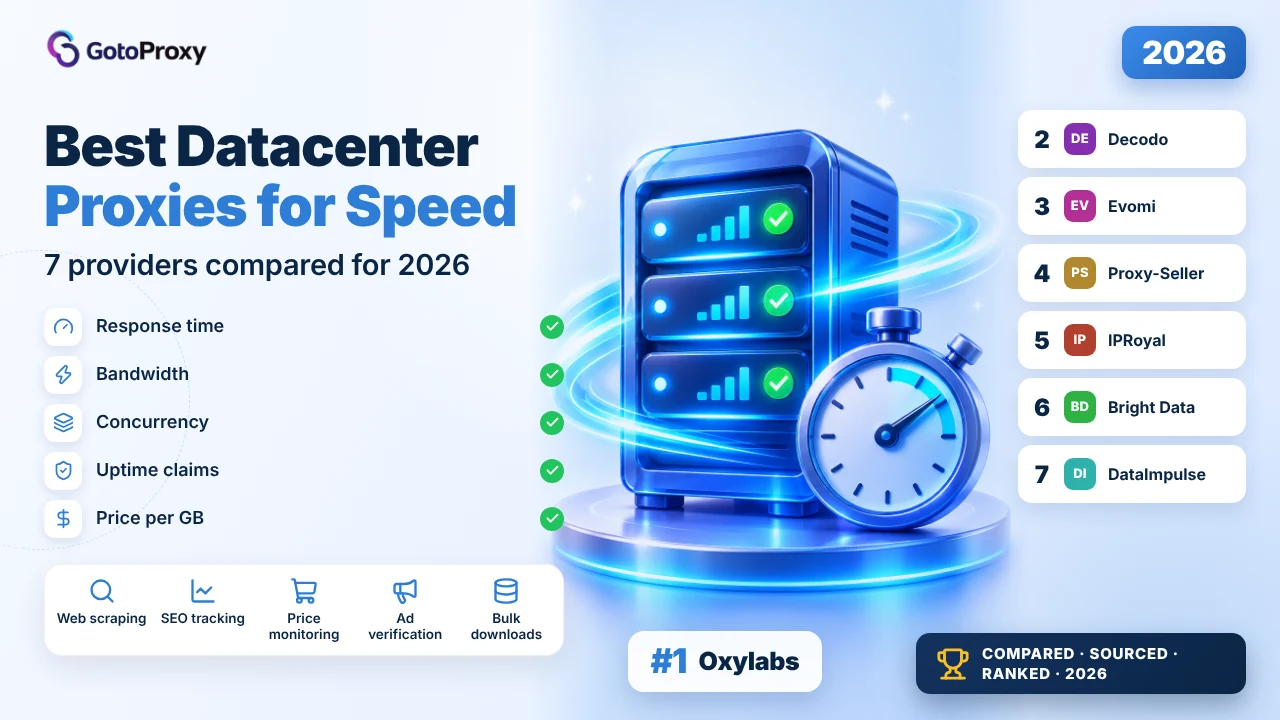
The best datacenter proxies for speed in 2026 are Oxylabs, Decodo and Evomi. Oxylabs advertises the fastest response, 0.222 s, with up to 1.9M dedicated IPs. Decodo advertises under 0.3 s and is the only one to explain its test, 500 requests per endpoint. Evomi lists a 0.45 s average at the lowest price, from $0.45 per GB.
- Every speed figure is advertised: Oxylabs lists 0.222 s, Decodo under 0.3 s and Evomi 0.45 s, while Proxy-Seller, IPRoyal and Bright Data publish no response time.
- Caps and blocks slow you more: Oxylabs’ per-GB plans cap traffic by plan, Bright Data includes 100 GB per IP, and Proxy-Seller lists no traffic limits.
- Test before you scale: Decodo’s 14-day money-back, Oxylabs’ $5 credit and DataImpulse’s $5 Intro pack let you time your own targets cheaply.
What makes the best datacenter proxies for speed?
Speed for datacenter proxies is three things: how quickly one request comes back (latency), how many requests you can run at once (concurrency), and how few you must retry after blocks. Advertised response times only cover the first. As of 2026, the fastest setups balance all three rather than chasing the lowest number.
Latency figures on pricing pages are the provider’s own. Oxylabs lists 0.222 s, Decodo under 0.3 s, Evomi 0.45 s, and DataImpulse both about 1 s and under 100 ms. Only Decodo says how it measured, with 500 requests per endpoint. Use these numbers to build a shortlist, then time your own targets.
New to this proxy type? Read datacenter proxies explained first. For the jobs where speed matters most, our guide to proxies for web scraping covers the common setups.
Advertised speed is a shortlist tool. Your own targets, timed during a trial or a small first buy, are the real test.
Why does speed mean more than latency in 2026?
Datacenter proxies are bought for speed and price, since they skip the home connections that slow residential traffic. But the industry is shifting: anti-bot systems flag hosting ranges faster, so a quick proxy that gets blocked ends up slower than a modest one that gets through. Speed now includes staying unblocked.
- Retries cost more than latency: A blocked request means a second request, so a 0.3 s proxy that often fails can lose to a 0.5 s one that succeeds.
- Concurrency beats raw speed: Unlimited threads per proxy, as IPRoyal lists, let you run many requests at once, which matters more than shaving off 0.1 s.
- Caps stop fast jobs: Oxylabs’ per-GB datacenter plans cap monthly traffic between 20 GB and 2 TB, so a fast job can stall when it hits the ceiling.
- Shared IPs share slowdowns: On a shared IP, another customer’s heavy use can slow you down. Proxy-Seller says its dedicated IPs are never shared.
- Subnet spread reduces blocks: Sites often block whole subnets, so spread matters. Proxy-Seller lists 600+ subnets, and Decodo up to 2K for dedicated IPs.
How do you set up datacenter proxies for maximum speed?
Most speed problems with datacenter proxies come from setup, not from the provider. Pick IPs close to your targets, reuse connections, run requests in parallel within each provider’s limits, and measure before you scale. The steps below use only what the providers publish, plus standard HTTP client settings.
- Pick IPs near your targetsChoose proxy countries close to the servers you query. Fewer network hops usually help more than any plan upgrade will.
- Reuse connectionsKeep-alive connections and HTTP sessions skip the handshake on every request, which saves time on repeated calls to the same host.
- Run requests in parallelRaise concurrency step by step. IPRoyal lists unlimited threads per proxy; elsewhere, check plan limits and fair-usage rules first.
- Rotate only when neededStatic datacenter IPs skip the gateway’s IP selection step. Rotate only when a target starts rate-limiting a single address.
- Time your own targetsLog response times for 100 requests per target during a trial or a small first buy, and compare providers on the same list.
- Watch the traffic capTrack usage against plan caps, such as Oxylabs’ 20 GB to 2 TB per-GB plans, so a fast job doesn’t stop halfway through a run.
Time one request through a proxy
curl -x http://USERNAME:PASSWORD@HOST:PORT -o /dev/null -s -w "%{time_total}\n" https://example.comThe number printed is the total time in seconds for that request. Run it 100 times per target and provider, and count failures too. If you check ads at speed, our list of Best Proxies for Google Ads Verification covers that job.
Which are the best datacenter proxies for speed in 2026?

Oxylabs publishes the fastest datacenter figure here: a 0.222 s response, with 99.9% uptime and success rate. That’s about a quarter of a second, roughly a blink. It also scales the furthest, up to 1.9M dedicated IPs in 188 countries. The weakness: per-GB plans cap monthly traffic, and the page doesn’t explain the test.

What does 0.222 s feel like? Roughly a blink: a request goes out and comes back before you’d register a delay. The figure is advertised, not independently measured, and the page doesn’t say how it was produced. Still, it’s the most specific number on any datacenter page read for this guide.
Capacity depends on the plan type. Pay per IP covers up to 36K IPs in 47 countries, pay per GB up to 56K IPs in 48 countries, and dedicated up to 1.9M IPs in 188 countries. Per-IP and dedicated plans are unlimited under fair usage, and HTTP, HTTPS and SOCKS5 all work.
The speed trap is the per-GB cap: included traffic varies by plan, between 20 GB and 2 TB, so a fast job can hit its ceiling mid-month. Prices run $0.60 per GB up to 25 GB and $0.40 from 6,250 GB, shared IPs from $1 and dedicated from $2. A $5 credit lets you try it first.
- 0.222 s advertised response
- 99.9% advertised uptime and success rate
- Up to 1.9M dedicated IPs in 188 countries
- $0.60 per GB up to 25 GB; $0.40 from 6,250 GB
- Shared from $1 per IP; dedicated from $2
- Latency-sensitive scraping
- Large dedicated IP fleets
- Country targeting in up to 188 countries
- Most specific speed claim here
- Largest dedicated pool
- SOCKS5 included
- Per-GB plans cap monthly traffic
- Speed test method not described
- Refund terms not visible
| Plan | Price | Traffic | Per GB |
|---|---|---|---|
| Per GB, up to 25 GB | Per GB | Capped by plan | $0.60 |
| Per GB, 6.25K+ GB | Per GB | Capped by plan | $0.40 |
| Shared per IP | From $1/IP | Fair usage | Per IP |
| Dedicated | From $2/IP | Fair usage | Per IP |
The page doesn’t explain how the 0.222 s figure was produced or from which locations. The $15 Starter plan’s traffic allowance isn’t stated on the page either.
Verdict: The fastest published number here, with room to scale; watch the per-GB cap. Read the full Oxylabs review →

Decodo’s datacenter page advertises an average response under 0.3 s and, unusually, explains its method: 500 requests per endpoint, with all 500 returning HTTP 200. As of 2026, that kind of disclosure is still rare. It also lists 99.99% uptime and a 14-day money-back. The weakness: a smaller listed pool than Oxylabs.

Under 0.3 s is close to Oxylabs’ figure, and still about a blink. What sets Decodo apart is the method note: 500 requests per endpoint, all returning HTTP 200, the status code for a successful request. It’s the provider’s own test, so treat it as advertised, but at least you know what was counted.
Pay per GB starts at $0.60 for 10 GB and falls to $0.45 at 1,000 GB and $0.38 at 10,000 GB, billed monthly plus VAT. Pay per IP starts at 100 IPs, from $0.10 per shared IP, and dedicated IPs start at $2.50, with unlimited traffic on dedicated plans across up to 2K subnets.
Coverage is narrower: 18 countries for per-GB and per-IP plans, and four for dedicated, the US, UK, Germany and Japan. The page’s meta text claims 500K+ IPs, while the body lists 100K+ shared IPs. HTTP(S) and SOCKS5 are supported, and the 14-day money-back makes a speed trial low-risk.
- Under 0.3 s advertised average response
- Method stated: 500 requests per endpoint, 500 HTTP 200s
- 99.99% advertised uptime
- $0.60 per GB at 10 GB; $0.38 at 10,000 GB
- 14-day money-back guarantee
- Buyers who want a stated test method
- Speed trials with a refund window
- Dedicated IPs in the US, UK, Germany or Japan
- Explains how its speed figure was produced
- 14-day money-back
- Unlimited traffic on dedicated IPs
- 18 countries for shared plans, 4 for dedicated
- Pool figures differ between meta text and body
- Billed monthly plus VAT
| Plan | Price | Traffic | Per GB |
|---|---|---|---|
| 10 GB | $6 | 10 GB | $0.60 |
| 1,000 GB | Monthly | 1,000 GB | $0.45 |
| 10,000 GB | $3,800 | 10,000 GB | $0.38 |
| Dedicated | From $2.50/IP | Unlimited | Per IP |
The page doesn’t name the targets or locations used in its 500-request test. Its free trial button doesn’t show any terms on the pricing page.
Verdict: Nearly as fast on paper as Oxylabs, and more open about how it got there. Read the full Decodo review →

Evomi pairs a decent advertised speed, a 0.45 s average and under 0.5 s overall, with the lowest per-GB price here: $0.45 pay as you go and $0.30 on the 1,000 GB plan. It also advertises 99.95% connection success and a 99.9% uptime SLA. The weakness: no datacenter pool size or country count.

Half a second is still quicker than most people notice, roughly the gap between clicking a link and the page starting to draw. Evomi lists two figures, under 0.5 s and an average of 0.45 s, plus 99.95% connection success. Like every number here, they come from the provider, not from an independent test.
Pricing is where Evomi pulls ahead: $0.45 per GB pay as you go for 1 GB, then $80 for 200 GB ($0.40), $175 for 500 GB ($0.35) and $300 for 1,000 GB ($0.30). Sessions are unlimited, and sticky sessions last 30 minutes by default and up to 24 hours, over HTTP, HTTPS or SOCKS5 over TCP.
Limits to know: datacenter auth is username and password only, since IP whitelisting isn’t supported, and the 195+ countries figure on the page is site-wide rather than datacenter-specific. The page mentions a free trial and a money-back guarantee, but the money-back terms aren’t on it.
- 0.45 s advertised average; under 0.5 s
- 99.95% connection success; 99.9% uptime SLA
- $0.45 per GB pay as you go; $0.30 on 1,000 GB
- Sessions up to 24 hours; unlimited sessions
- HTTP, HTTPS and SOCKS5 over TCP
- Budget speed-sensitive scraping
- Volumes of 200 to 1,000 GB a month
- Jobs that need 24-hour sessions
- Lowest per-GB price here
- Uptime SLA stated
- Long optional sessions
- No datacenter pool size listed
- No IP whitelisting
- Money-back terms not on the page
| Plan | Price | Traffic | Per GB |
|---|---|---|---|
| Pay as you go | $0.45 | 1 GB | $0.45 |
| Basic | $80/mo | 200 GB | $0.40 |
| Standard | $175/mo | 500 GB | $0.35 |
| Advanced | $300/mo | 1,000 GB | $0.30 |
The page gives two response figures, under 0.5 s and a 0.45 s average, without saying how either was measured. Datacenter countries aren’t listed apart from the site-wide 195+.
Verdict: The best balance of advertised speed and price on this list.

Proxy-Seller doesn’t publish a response time, but it promises the things that keep a busy job fast: a 1 Gbps channel, no traffic limits and dedicated IPs that are never shared, so no neighbour slows you down. US, UK and German IPv4 starts at $0.90 per IP. The weakness: there’s no latency figure to compare.

Speed for datacenter work is partly about the pipe. The price page lists a 1 Gbps channel and no traffic limits, so a large download doesn’t get throttled at a monthly cap. Dedicated IPs are never shared, which matters because a busy neighbour on a shared IP can slow you down or get the IP blocked.
IPv4 for the US, UK and Germany costs $0.90 per IP for 5, $0.77 for 50, $0.72 for 100, $0.59 for 500 and $0.50 for 3,000. ISP IPs cost from $1.50, and IPv6 runs from $0.08 for 20 down to $0.04. The page lists 600+ subnets, 99.7%+ uptime, and HTTP(S) and SOCKS5.
As of 2026, many sites flag whole datacenter subnets, so subnet variety matters as much as raw speed, and 600+ subnets give you room to spread IPs. What’s missing: any response time, and the rental period in the price table. Refunds or replacements are offered within 24 hours of delivery.
- 1 Gbps channel; no traffic limits
- Dedicated IPs never shared
- IPv4 $0.90 per IP for 5, $0.50 for 3,000
- 600+ subnets; 99.7%+ uptime
- Refund or replacement within 24 hours of delivery
- Large downloads through fixed IPs
- Jobs that can’t live with traffic caps
- Spreading IPs across many subnets
- No traffic limits
- Never-shared dedicated IPs
- Low price per IP at volume
- No response time published
- Rental period not named in the table
- 24-hour refund window
| Plan | Price | Traffic | Per GB |
|---|---|---|---|
| IPv4, 5 IPs | $0.90/IP | No limit | Per IP |
| IPv4, 100 IPs | $0.72/IP | No limit | Per IP |
| IPv4, 3,000 IPs | $0.50/IP | No limit | Per IP |
| ISP, 5 IPs | $1.50/IP | No limit | Per IP |
The page states 99.7%+ uptime but no response time or success rate. The FAQ mentions discounts up to 40%, while the price list says up to 30%.
Verdict: The best pick for sustained throughput, though there’s no latency number to compare. Read the full Proxy-Seller review →

IPRoyal’s datacenter proxies allow unlimited threads per proxy, so one IP can carry many parallel connections, and the page advertises 99.9% uptime across 50+ countries with state and city targeting. Prices start at $1.57 per proxy for 30 days. The weakness: no speed figure at all, so there’s nothing to compare on paper.

Threads are the hidden speed lever. A plan that caps connections per IP forces you to queue requests, however quick each one is. IPRoyal’s page lists unlimited threads per proxy, which lets a crawler run many requests in parallel through each address. The page doesn’t give a response time to go with it.
Pricing is per proxy and per period: $1.57 for 30 days, $1.48 for 60 days and $1.39 for 90 days, as starting prices. Targeting covers 50+ countries with state and city options, and HTTP/HTTPS and SOCKS5 both work, with dual authentication by IP or by username and password.
A trend to note: per-GB datacenter billing at Decodo, Oxylabs and Evomi suits bursty jobs, while IPRoyal’s per-proxy model suits steady ones that run all month. What’s missing here is a response time, a pool size and refund terms, so check those with support before you scale.
- Unlimited threads per proxy
- $1.57 per proxy for 30 days; $1.39 for 90 days
- 50+ countries with state and city targeting
- 99.9% advertised uptime
- HTTP/HTTPS and SOCKS5; dual authentication
- High concurrency per IP
- Steady all-month workloads
- State or city targeting
- Unlimited threads per proxy
- State and city targeting
- Longer rentals cost less
- No speed figure published
- No pool size listed
- No refund terms on the page
| Plan | Price | Traffic | Per GB |
|---|---|---|---|
| 30 days | $1.57/IP | Not stated | Per IP |
| 60 days | $1.48/IP | Not stated | Per IP |
| 90 days | $1.39/IP | Not stated | Per IP |
The datacenter pricing page doesn’t state bandwidth or traffic limits per proxy. Prices are labelled as starting prices, so some countries or periods may cost more.
Verdict: Good for parallel connections through each IP, if you can live without a speed number. Read the full IPRoyal review →

Bright Data has the largest shared-and-dedicated datacenter pool here at 1,300,000+ IPs, which helps speed indirectly: more IPs means fewer blocks and less retrying. Per-GB traffic starts at $0.60 pay as you go. The weakness: the datacenter page publishes no response time or success rate, and per-IP plans include 100 GB a month.

A blocked request is the slowest request of all, because you pay for the retry. That’s why pool size matters for speed in 2026, as more sites flag datacenter ranges. Bright Data lists 1,300,000+ shared and dedicated IPs, and its FAQ says dedicated IPs are available in 195 countries.
Per GB, pay as you go is $0.60, and plans run $499 for 1 TB ($0.51), $999 for 2 TB ($0.45) and $1,999 for 5 TB ($0.42). Per IP, two unlabelled tables start at $1.40 and $2.20 for 10 IPs. Each per-IP plan includes 100 GB of fair usage per IP per month, and extra may be charged.
What’s missing for a speed-first buyer: a response time and a datacenter success rate. The 99.99% uptime figure sits in an enterprise feature list, not next to the datacenter prices. A free trial doesn’t bill trial traffic, so you can time your own targets before paying anything.
- 1,300,000+ shared and dedicated datacenter IPs
- $0.60 per GB pay as you go; $0.42 on 5 TB
- Per IP from $1.40 (10 IPs) in the first table
- 100 GB fair usage per IP per month
- Free trial; trial traffic isn’t billed
- Rotating across a very large pool
- Teams already on Bright Data
- Monthly volumes of 1 TB and up
- Largest shared pool here
- Per-GB plans up to 5 TB
- Trial traffic isn’t billed
- No response time or success rate published
- 100 GB fair usage per IP
- Per-IP tables unlabelled
| Plan | Price | Traffic | Per GB |
|---|---|---|---|
| Pay as you go | $0.60/GB | Any amount | $0.60 |
| 1 TB | $499/mo | 1 TB | $0.51 |
| 5 TB | $1,999/mo | 5 TB | $0.42 |
| Per IP (table 1) | From $1.40/IP | 100 GB per IP | Per IP |
The meta description claims datacenter proxies from $0.077 per GB, a price that doesn’t appear in the page body. The 99.99% uptime figure is listed under enterprise features.
Verdict: Pool size is its speed argument; there’s no published latency to back it up. Read the full Bright Data review →

DataImpulse lists the biggest datacenter pool here, 20M IPs in 195+ countries, at $0.50 per GB with traffic that never expires. For speed, though, its page contradicts itself: it lists both a response time of about 1 s and sub-100 ms latency. Until that’s cleared up, it’s the budget pick, not the speed pick.

Which number is right, 1 s or under 100 ms? The page doesn’t say how either was measured, and a tenfold gap is too wide to average. About 1 s is roughly the pause before a slow page starts to draw; under 100 ms would beat every other figure here. Time your own targets on a small first purchase.
Prices are simple: an Intro pack of 10 GB for $5 for new users, $50 for 100 GB, $450 for 1 TB ($0.45) and custom from $2,250 for 5 TB and up. Traffic never expires. The page advertises 99.51% success and 99.9% uptime over HTTP(S) and SOCKS5, with sticky sessions up to 30 minutes.
The pool claim, 20M datacenter IPs, is the largest on this list by far, which helps with blocks if it holds. Authorization works by IP, and the code samples use login and password. The refund policy covers 7 days, and no free trial is stated, so the $5 Intro pack is the cheapest way in.
- 20M datacenter IPs in 195+ countries
- $0.50 per GB; $0.45 on 1 TB
- Traffic never expires
- Response listed as ~1 s and as sub-100 ms
- 99.51% advertised success; 7-day refund
- Budget datacenter traffic
- Bursty jobs that need traffic to last
- Large pools for rotation
- Biggest listed datacenter pool
- Traffic never expires
- $5 entry pack
- Contradictory speed claims
- Sticky sessions capped at 30 minutes
- No free trial stated
| Plan | Price | Traffic | Per GB |
|---|---|---|---|
| Intro | $5 | 10 GB | $0.50 |
| Basic | $50 | 100 GB | $0.50 |
| Advanced | $450 | 1 TB | $0.45 |
| Custom+ | From $2,250 | 5 TB+ | Custom |
The datacenter page gives both about 1 s and sub-100 ms latency without describing a method. Concurrency isn’t stated on the page, and neither is a pool split by country.
Verdict: A cheap, large pool; not a proven speed pick until its own numbers agree.
How do advertised response times and prices compare?
These bars use advertised figures from each provider’s datacenter page, read on November 12, 2026. Nothing was measured here, and only Decodo explains how its own speed figure was produced.
Figures are the ones each provider publishes, checked on November 12, 2026. They are advertised numbers, not test results.
How do the 7 fast datacenter proxy providers compare?
One table, the same rows for every provider, in ranking order. Figures come from datacenter pages read on November 12, 2026, and bold marks the strongest value in each row.
| Oxylabs Top | Decodo | Evomi | Proxy-Seller | IPRoyal | Bright Data | DataImpulse | |
|---|---|---|---|---|---|---|---|
| Adv. response | 0.222 s | Under 0.3 s | 0.45 s average | Not listed | Not listed | Not listed | ~1 s and sub-100 ms |
| Test method stated | No | 500 requests per endpoint | No | No figure | No figure | No figure | No |
| Adv. uptime | 99.9% | 99.99% | 99.9% SLA | 99.7%+ | 99.9% | 99.99% (enterprise list) | 99.9% |
| Traffic limit | Per-GB plans capped by plan | Per GB; dedicated unlimited | Per GB plans | No traffic limits | Not stated | 100 GB fair usage per IP | Per GB, never expires |
| Pool | Up to 1.9M dedicated | 100K+ shared (500K+ in meta) | Not listed | 600+ subnets | Not listed | 1.3M+ | 20M |
| Countries | Up to 188 (dedicated) | 18; 4 for dedicated | 195+ site-wide | US, UK, Germany and 15+ more | 50+ with state and city | 195 for dedicated (FAQ) | 195+ |
| Entry price | $0.60/GB or $1/IP | $0.60/GB | $0.45/GB | $0.90/IP | $1.57/IP for 30 days | $0.60/GB | $0.50/GB |
| Trial or refund | $5 credit | 14-day money-back | Free trial; terms elsewhere | 24 hours after delivery | Not on page | Free trial | 7-day refund |
Which datacenter setup is fastest for your job?
Speed means different things for different jobs. Match the setup to the bottleneck you actually have, then shortlist from the providers above.
Fast datacenter proxies: common questions
I read each provider’s datacenter pricing page on November 12, 2026, and copied speed, uptime and price figures exactly as advertised. Nothing was bought or timed. Scores weight advertised speed and method 35%, capacity and traffic limits 20%, reliability claims 15%, price 15% and protocol and targeting options 15%. Compare more proxy providers, or see ProxyRates community scores. Scores are our editorial rating built from published prices, features and terms. They are not lab measurements.