
7 Best Proxies with API Access for Automation in 2026 (Auth, Endpoints and Prices)
7 Best Proxies with API Access for Automation in 2026 (Auth, Endpoints and Prices)
Say your scraper fleet grows from 5 workers to 40 overnight, and each one needs its own sub-user, a 10 GB cap and an allowlisted server IP. In a dashboard that’s an afternoon of clicking; with the right API it’s a loop. These are the best proxies with API access for that job, compared on auth, endpoints and price. GoToProxy earns a commission on some links here at no extra cost to you.
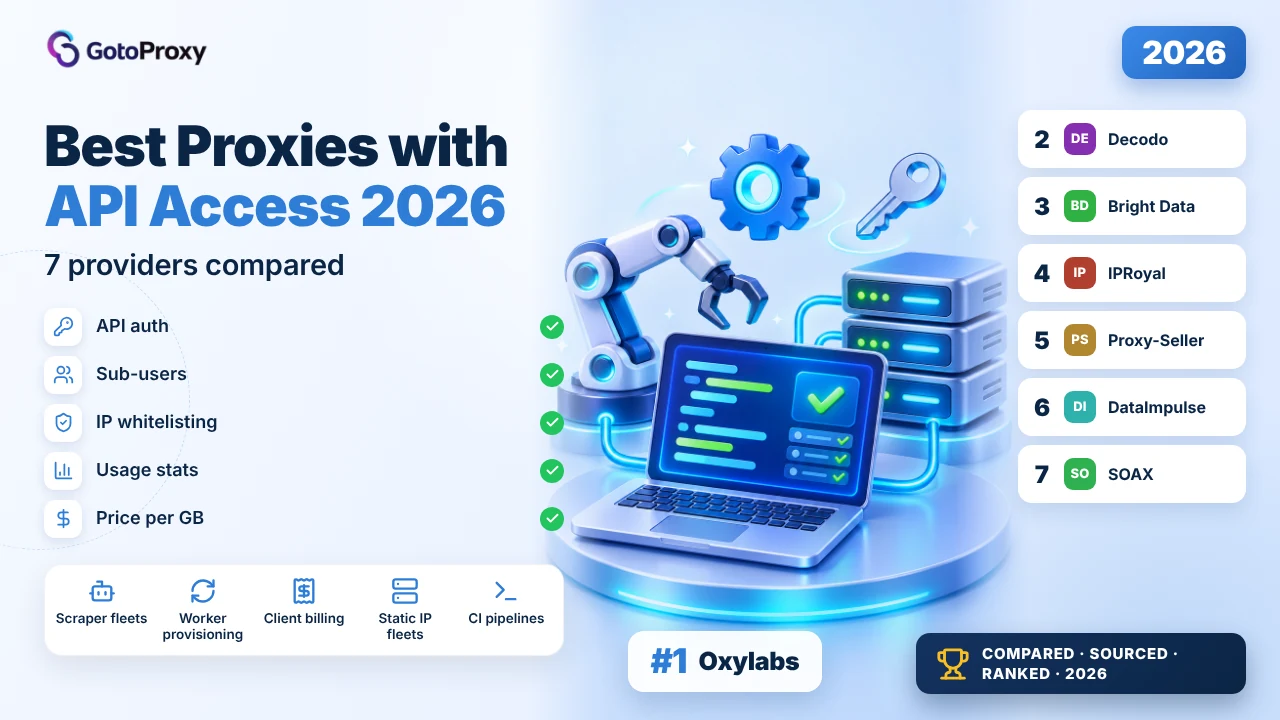
The best proxies with API access in 2026 are Oxylabs, Decodo and Bright Data. Oxylabs documents a JWT login, full sub-user control and per-domain traffic stats. Decodo’s API covers users, traffic limits, whitelisted IPs and endpoint lists, with a 3-day trial. Bright Data has scoped, expiring API keys and zone endpoints.
- Auth models differ a lot: Oxylabs swaps Basic auth for a 1-hour JWT, Bright Data and IPRoyal use Bearer keys, and Proxy-Seller puts the key in the URL path.
- Scope differs too: Decodo manages users, whitelists and endpoints; IPRoyal adds daily, monthly and lifetime traffic caps; Proxy-Seller manages static IP fleets.
- The cheapest proxy has the thinnest API: DataImpulse charges $1 per GB, but its API is a reseller collection without endpoints listed on the page.
What does a proxy API need to do for automation?
A proxy API is the provider’s management interface, separate from the proxy endpoint your traffic goes through. For automation it should create and remove sub-users, cap their traffic, allowlist server IPs, return usage stats and hand back endpoint strings. The best-for map: Oxylabs for documented sub-user control, Decodo for scope with a trial, Bright Data for key security, IPRoyal for traffic caps and Proxy-Seller for static fleets.
Don’t confuse it with a scraper API. Scraper or Web Data APIs take a URL and return a page; this article is about managing proxies themselves. Most providers sell both, and the auth often differs: Bright Data, for example, lets you call its request API with an API key or use the proxy with a username and password, billed at the same rate.
What should you check first? Three things: how you authenticate and how long a token lives, whether errors come back as HTTP errors or inside a 200 response, and whether rate limits are documented. None of the docs read for this article stated a rate limit, so build backoff into your client regardless.
If your automation drives social or marketplace accounts rather than scrapers, our guides to proxies for social media and TikTok Account Proxies cover the session side.
Short version: Oxylabs for depth, Decodo to test, Bright Data for safe keys.
Why automate proxy management with an API?
Because manual setup doesn’t scale past a handful of workers, and mistakes in a dashboard are invisible until traffic runs out. An API turns provisioning, caps and reporting into code you can review. Here’s what each pick does best.
- Best documented: Oxylabs: POST /login returns a JWT for 1 hour; sub-users are full CRUD; stats come per sub-user, per target domain and per month.
- Widest scope: Decodo: Users, traffic limits, usage reports, whitelisted IPs, endpoint lists and subscription status, with a 3-day trial to test it.
- Safest keys: Bright Data: Five permission levels and expiring keys, so a worker that rotates passwords can’t touch billing.
- Traffic caps: IPRoyal: give-traffic and take-traffic endpoints plus daily, monthly and lifetime limits per sub-user.
- Static fleets: Proxy-Seller: List, export, replace and extend IPs, and create residential lists with rotation from sticky to 3,600 seconds.
How do you call a proxy API from Python?
Three patterns cover most of these APIs: a login that returns a short-lived token, a static Bearer token, and a key in the URL. The samples below follow each provider’s own docs as read on October 31, 2026. Replace the words in capitals with your own values.
- Create a dedicated key or userDon’t automate with your main login if you can avoid it. Bright Data lets you scope a key to the Limit role; IPRoyal’s token can be reset from Settings, API.
- Store secrets outside codeRead keys from environment variables. Bright Data’s SDKs already read BRIGHTDATA_API_KEY.
- Handle token expiryOxylabs tokens last 1 hour; refresh on a 401 instead of on a timer.
- Check the body, not only the statusProxy-Seller returns business errors as HTTP 200 with an errors array.
- Back off on failuresNo rate limits were documented on the pages read, so retry with a growing delay.
- Log usage per sub-userPull stats daily so a runaway worker shows up before the balance hits zero.
Oxylabs: login, then read monthly traffic
import requests

BASE = "https://residential-api.oxylabs.io/v2"
login = requests.post(f"{BASE}/login", auth=("USERNAME", "PASSWORD"), timeout=30).json()
headers = {"Authorization": f"Bearer {login['token']}"}

stats = requests.get(f"{BASE}/users/{login['user_id']}/client-stats", headers=headers, timeout=30)
print(stats.json())
IPRoyal: create a sub-user with 10 GB
import requests

r = requests.post(
    "https://resi-api.iproyal.com/v1/residential-subusers",
    headers={"Authorization": "Bearer API_TOKEN"},
    json={"username": "WORKER_NAME", "password": "WORKER_PASSWORD", "traffic": 10.0},
    timeout=30,
)
print(r.status_code, r.json())
Proxy-Seller: list proxies and catch hidden errors
import requests

r = requests.get("https://proxy-seller.com/personal/api/v1/API_KEY/proxy/list", timeout=30)
data = r.json()
if data.get("errors"):  # business errors still come back as HTTP 200
    raise RuntimeError(data["errors"])
print(data)
For the traffic side of automation, see our proxies for web scraping guide, and test new endpoints with our free proxy checker before you scale them.
Scoped keys, refresh on 401, and read the body of every 200.
Which are the best proxies with API access for automation in 2026?

Oxylabs wins because its residential Public API is the most completely documented here: a login call that returns a JWT valid for 1 hour, full sub-user create, modify and delete, and traffic stats per sub-user, per target domain and per month. Unlike Decodo’s docs, the auth flow is spelled out step by step. The weakness: $6 per GB on small buys.
How does auth work? You send POST /login to https://residential-api.oxylabs.io/v2 with your main user’s credentials as HTTP Basic auth. The response carries a user_id and a JWT. Every other call sends Authorization: Bearer with that token, and you log in again when it expires after 1 hour. Build the refresh into your client from day one.
What can you automate? Listing, creating, patching and deleting sub-users; reading traffic for one sub-user; per-target-domain traffic for the last 30 days; and total client traffic for the current month. The page says traffic limits can be set but doesn’t document the parameter, and whitelisting isn’t covered on that page. Proxy traffic itself goes through pr.oxylabs.io:7777, rotating per request by default.
What does it cost? Residential is $6 per GB up to 5 GB, $5 up to 20 GB, $4 up to 125 GB and $2.50 from 1,000 GB, with a $5 welcome credit to test. The residential page lists unlimited concurrent sessions, 3 proxy users and 10 whitelisted IPs, and integration guides for Selenium, Puppeteer and Playwright.
- Base URL https://residential-api.oxylabs.io/v2
- POST /login with Basic auth returns a JWT valid 1 hour
- Sub-users: list, create, PATCH, delete
- Stats per sub-user, per target domain (30 days) and per month
- $6 per GB up to 5 GB; $2.50 from 1,000 GB; unlimited concurrent sessions
- Agencies giving each client a sub-user
- Billing dashboards built on per-domain traffic
- Large parallel scraping fleets
- Auth flow fully documented
- Per-target-domain traffic stats
- Unlimited concurrent sessions
- $5 credit to test the API
- $6 per GB on small buys
- JWT needs a refresh every hour
- Traffic-limit parameter not documented on the page read
| Plan | Price | Traffic | Per GB |
|---|---|---|---|
| Up to 5 GB | Pay as you go | Up to 5 GB | $6.00 |
| Up to 20 GB | Pay as you go | Up to 20 GB | $5.00 |
| Up to 125 GB | Pay as you go | Up to 125 GB | $4.00 |
| 1K+ GB | Pay as you go | 1,000 GB and up | $2.50 |
The Public API page doesn’t state rate limits. Session control (sessid, sesstime up to 1,440 minutes) is done in the proxy username, not through the API.
Verdict: Best for code-driven sub-user and traffic management; not ideal for a 2 GB side project. Read the full Oxylabs review →

Decodo’s Public API has the widest scope on the pages read: create, update and delete proxy users, per-user traffic limits, usage reports, whitelisted IPs, endpoint and port lists, and subscription status. Compared with Oxylabs, it adds whitelist and endpoint management. And unlike Oxylabs’ $5 credit, there’s a 3-day trial. Its docs say less about auth.

How does auth work? The API reference lists https://api.decodo.com with paths such as GET /v2/sub-users, and an API key sent in a header named Authorization. The reference page read doesn’t show the value format or where the key is issued, so check the dashboard before writing your client. Decodo points to a GitHub repository for code examples.
What can you automate? The FAQ lists creating, updating and deleting proxy users, setting traffic limits per user, generating usage reports, managing whitelisted IPs, filtering and listing endpoints with ports, and checking subscription status. That’s enough to onboard a new worker end to end: create a user, cap its traffic, allowlist its server and hand it an endpoint.
What does it cost? Plans start at 3 GB for $11.25 ($3.75 per GB), with $2.75 at 100 GB and $2 at 1,000 GB; pay as you go is $4. The 3-day trial gives 100MB, and eligible plans have a 14-day money-back. Proxy traffic uses gate.decodo.com:7000 with rotation per request or on a timer, and sticky sessions from minutes to days.
- Base https://api.decodo.com; example GET /v2/sub-users
- API key in the Authorization header
- Users, traffic limits, usage reports, whitelisted IPs, endpoints, subscriptions
- 3-day trial with 100MB; 14-day money-back
- 3 GB for $11.25; $2 per GB at 1,000 GB
- Testing an API integration before buying
- Teams that allowlist server IPs from code
- Monthly jobs of 3 to 100 GB
- Widest API scope here
- Whitelist and endpoint management
- Trial plus money-back
- All targeting levels included
- Auth value format not shown on the reference page
- Concurrency limit not stated
- Rate limits not stated
| Plan | Price | Traffic | Per GB |
|---|---|---|---|
| 3 GB | $11.25 a month | 3 GB | $3.75 |
| 25 GB | $81.25 a month | 25 GB | $3.25 |
| 100 GB | $275 a month | 100 GB | $2.75 |
| 1,000 GB | $2,000 a month | 1,000 GB | $2.00 |
| Pay as you go | No commitment | Any | $4.00 |
Decodo also sells a separate Web Data API for scraping; this review covers the Public API for proxy management only.
Verdict: Best for testing a broad proxy-management API risk-free; not ideal if you need documented rate limits. Read the full Decodo review →

Bright Data has the best API key controls here: five permission levels from Admin to User, an expiry date on each key, and a Limit role that can only manage proxy passwords and allowlists. Its API reference lists endpoints to add a zone, list active zones, read zone passwords and manage a zone’s IP allowlist. Unlike Proxy-Seller, the key never sits in a URL.
How does auth work? Requests send the key as Authorization: Bearer. Admins create keys under Account settings, Users and API keys; each key is shown once, and refreshing one kills the old key. The docs strongly recommend setting an expiry. The CLI and the Python and JavaScript SDKs can read BRIGHTDATA_API_KEY from the environment.
Why does scoping matter for automation? A worker that only rotates zone passwords or edits an allowlist can run with the Limit role, so a leaked key can’t touch billing. Compared with Proxy-Seller, whose key sits in the URL path, or Oxylabs, whose JWT comes from your main login, that’s the safest model in this list. API Access and Native Access (proxy username and password) are billed at the same rate.
What does it cost? Residential pay as you go is $4 per GB under a 3-month 50% promo (code RESIGB50), $8 at list, and monthly plans start at $499 for 141 GB. There’s a free trial without a stated length and a first-deposit match of up to $500. City, state and ZIP targeting are included.
- API key as a Bearer token; created by admins
- Permission levels: Admin, Finance, Ops, Limit, User
- Expiry date or unlimited per key; key shown once
- Reference lists add zone, active zones, zone passwords, zone IP allowlist
- $4 per GB under a 50% promo; $8 list
- Security-conscious teams
- Rotating zone passwords from CI
- Large budgets with many zones
- Scoped permission levels
- Expiring keys
- SDKs read the key from the environment
- Zone and allowlist endpoints
- Promo price ends after 3 months
- Concurrency not stated on the pricing page
- Monthly plans start at $499
| Plan | Price | Traffic | Per GB |
|---|---|---|---|
| Pay as you go | No commitment | Any | $4 promo, $8 list |
| $499 a month | Monthly | 141 GB | $4 promo, $7 list |
| $999 a month | Monthly | 332 GB | $3 promo, $6 list |
| $1,999 a month | Monthly | 798 GB | $3 promo, $5 list |
The zone endpoints are named in Bright Data’s API reference listing; their request details weren’t read for this article.
Verdict: Best for least-privilege API keys; not ideal for small fixed budgets after the promo. Read the full Bright Data review →

IPRoyal’s residential API is the best for metering traffic: you create sub-users with a GB allowance, move traffic to and from them, and set daily, monthly and lifetime limits. Compared with Oxylabs, whose traffic-limit parameter isn’t documented on the page read, the caps here are explicit. The weakness: $7 for the first GB.

How does auth work? Requests go to https://resi-api.iproyal.com/v1 with Authorization: Bearer and your API token, which you find and reset under Settings, API in the dashboard. Note the migration: the legacy API was retired on September 15, 2025, so old scripts need the new base URL.
What can you automate? POST /residential-subusers creates a sub-user with a username, password and traffic in GB; GET lists them with paging and search; update and delete work by the sub-user’s hash. POST …/give-traffic and …/take-traffic move gigabytes between the main account and a sub-user, and deleting a sub-user returns its traffic to the main balance.
What does it cost? 1 GB is $7 on subscription, $5.25 at 10 GB and $1.75 from 10 TB, and traffic never expires, so unused sub-user allowances keep their value. The residential page lists unlimited concurrent sessions, rotation per request or sticky sessions up to 7 days, and a free trial.
- Base https://resi-api.iproyal.com/v1; Bearer token from Settings, API
- Sub-users: create, list, get, update, delete by hash
- give-traffic and take-traffic endpoints
- Daily, monthly and lifetime limits per sub-user
- Legacy API retired September 15, 2025
- Resellers metering client traffic
- Teams capping each worker per day
- Long sticky sessions for accounts
- Explicit daily, monthly and lifetime caps
- Traffic moves between account and sub-users
- Traffic never expires
- Sticky sessions up to 7 days
- $7 per GB on a 1 GB buy
- Rate limits not stated
- Legacy integrations needed a migration
| Plan | Price | Traffic | Per GB |
|---|---|---|---|
| 1 GB | Subscription | 1 GB | $7.00 |
| 10 GB | Subscription | 10 GB | $5.25 |
| Custom | From 10 TB | 10,000 GB and up | $1.75 |
| 1 GB | Pay as you go | 1 GB | $7.35 |
The sub-users page names the update method as UPDATE but its code examples use PUT; follow the examples.
Verdict: Best for metering traffic per sub-user; not ideal for a cheap first gigabyte. Read the full IPRoyal review →

Proxy-Seller’s API is the most practical for static IP fleets: list active IPs with expiry dates, export them as txt, csv or json, replace an IP in its slot, extend selected IPs and add notes. For residential, one call creates a list with geo, whitelist and rotation from sticky to 3,600 seconds. The weakness: the API key sits in the URL path.

How does auth work? Every call goes to https://proxy-seller.com/personal/api/v1/YOUR_API_KEY/ followed by the endpoint, so the key appears in every URL. Unlike Bright Data’s Bearer header, that means it can end up in proxy logs and error trackers; keep those URLs out of shared logs. A second trap: business errors come back as HTTP 200 with an errors array, so check the body, not just the status.
What can you automate? GET /proxy/list returns active IPs with status, country, port and expiry; GET /proxy/download exports them; POST /proxy/replace swaps an IP against a monthly quota; POST /prolong/calc prices an extension per IP-day. For residential, POST /resident/list/add takes a title, a whitelist, geo by country, region, city and ISP, up to 1,000 ports and a rotation value: -1 sticky, 0 per request, or 1 to 3,600 seconds.
What does it cost? The residential Test plan is $3.50 per GB for 30 days, Volume from $1.45 and Enterprise from $0.3, all valid 30 days. Code GOTO15OFF takes a discount at checkout, and the FAQ allows a replacement or refund within 24 hours. The page advertises about 0.35 s response and unlimited concurrent sessions.
- Base https://proxy-seller.com/personal/api/v1/YOUR_API_KEY/
- Proxy list, export (txt, csv, json), replace, extend, notes
- Residential list: geo, whitelist, up to 1,000 ports, rotation -1, 0 or 1 to 3,600 s
- Business errors return HTTP 200 with errors[]
- Test plan $3.50 per GB, valid 30 days
- Static IPv4, ISP and IPv6 fleets
- Rotation timing set per list
- Exporting proxy lists into other tools
- Static fleet management endpoints
- Rotation set per list from code
- Fast advertised response
- Coupon code GOTO15OFF
- API key in the URL path
- Errors hidden behind HTTP 200
- Traffic expires after 30 days
| Plan | Price | Traffic | Per GB |
|---|---|---|---|
| Test | Pay per GB | Valid 30 days | $3.50 |
| Volume | Custom size | Valid 30 days | From $1.45 |
| Enterprise | Custom, premium SLA | Custom | From $0.30 |
The create-list page states a maximum of 1,000 ports but its sample response shows 10,000; test the limit before relying on it.
Verdict: Best for automating static IP fleets and residential lists; not ideal if keys in URLs break your security policy. Read the full Proxy-Seller review →

DataImpulse is the cheapest proxy here at $1 per GB, and its gigabytes never expire. Its API story is thin by comparison: the docs describe a Reseller API, published as a Postman collection, that manages sub-users, without listing endpoints, auth or a base URL on the page read. Unlike Oxylabs or IPRoyal, you can’t see the API’s shape before signing up.

What can you automate? Per the resellers page, sub-user management through the Reseller API, with other endpoints available on request from support. For most automation you won’t need more than the proxy itself: gw.dataimpulse.com on port 823 with a login and password, or IP authorization, both listed on the residential page.
Why rank it at all? Because for many jobs, the proxy bill outweighs the API. At $1 per GB, 100 GB costs $100, against $400 at Decodo’s 3 GB plan rate or $600 at Oxylabs’ small-buy rate. Intro gives new customers 5 GB for $5, and the Advanced plan drops to $0.80 per GB at 1 TB.
Where does it fall short? Speed and session detail: about 1 s advertised response, sticky sessions with no stated duration, and city, ASN and ZIP targeting at extra cost. The page lists HTTP(S) and SOCKS5, names Puppeteer, Playwright and Selenium among its integrations, and offers a 7-day refund.
- Reseller API documented as a Postman collection; manages sub-users
- Auth and base URL not stated on the page read
- $1 per GB; 5 GB for $5 for new customers
- Gigabytes never expire; 7-day refund
- gw.dataimpulse.com:823 with login or IP authorization
- Budget scrapers with fixed configs
- Resellers starting small
- Irregular monthly usage
- $1 per GB, lowest here
- Gigabytes never expire
- Login or IP authorization
- HTTP(S) and SOCKS5
- API aimed at resellers, endpoints not listed
- Auth not documented on the page
- About 1 s advertised response
| Plan | Price | Traffic | Per GB |
|---|---|---|---|
| Intro (new customers) | $5, one time | 5 GB | $1.00 |
| Basic | $50 | 50 GB | $1.00 |
| Advanced | $800 | 1 TB | $0.80 |
| Custom+ | From $4,000 | 5 TB and up | Custom |
The resellers page says endpoints that aren’t implemented yet can be requested from support.
Verdict: Best for cheap traffic with simple automation; not ideal if your workflow depends on a rich API.

SOAX’s developer docs list API authentication, an endpoint to get a package and one to get connection strings, and its help center explains whitelisting your IP through the API. That covers the basics of wiring proxies into code, but compared with Decodo or Oxylabs I found less detail on sub-users or stats. No price appeared on the pages read.
What can you automate? Reading your package and pulling connection strings, which saves building host, port and login strings by hand, plus IP whitelisting via the API. The details sit on separate pages under developers.soax.com that weren’t read for this article, so treat the scope as the minimum, not the maximum.
What about the proxies? SOAX’s location pages list HTTP(S) and SOCKS5, UDP and QUIC on residential and mobile, unlimited concurrent sessions, automatic rotation per task or by your own rules, and sticky IPs. That’s a strong feature set for automation, comparable to IPRoyal’s.
What does it cost? The pages read showed no price, only a link to a pricing page. There’s no free trial: you open a free Sandbox account and buy credits to test. Payment options are wide: Visa, American Express, Mastercard, wire transfer and five cryptocurrencies.
- Developer docs: API authentication, get a package, get connection strings
- Help center: whitelist your IP via the API
- Unlimited concurrent sessions; rotation per task or custom rules
- No free trial; free Sandbox with paid credits
- Cards, wire and five cryptocurrencies accepted
- Pulling ready connection strings into config
- Mobile and residential automation
- Buyers paying by wire or crypto
- Connection strings from the API
- Unlimited concurrent sessions
- UDP and QUIC support
- Nine payment methods
- No price on the pages read
- No free trial
- Sub-user and stats endpoints not confirmed
| Plan | Price | Traffic | Per GB |
|---|---|---|---|
| Sandbox | Free account | No credits included | Sandbox rates |
| Residential and mobile | See pricing page | Not on the pages read | Not listed |
Only the titles of SOAX’s API pages were seen in search results; the endpoint details weren’t read.
Verdict: Best for pulling connection strings from code; not ideal if you need a published price or rich user management. Read the full SOAX review →
How do API scope and price compare?
These bars summarise what each provider’s docs and pricing pages state. Nobody here benchmarked the APIs. The scope chart counts the management areas confirmed on the pages read or in the docs’ page titles: users, traffic limits, stats, whitelisting, endpoint or IP lists, and orders or subscriptions.
Figures are the ones each provider publishes, checked on October 31, 2026. They are advertised numbers, not test results.
How do the 7 proxy APIs compare?
One table, the same rows for every provider, in ranking order. Bold marks a clear plus. API details come from each provider’s docs read on October 31, 2026; prices from residential pages read on October 30.
| Oxylabs Top | Decodo | Bright Data | IPRoyal | Proxy-Seller | DataImpulse | SOAX | |
|---|---|---|---|---|---|---|---|
| Auth | Basic login, JWT for 1 h | API key in Authorization header | Scoped, expiring Bearer keys | Bearer token from dashboard | Key in URL path | Not stated | Auth page exists |
| Sub-users | Create, PATCH, delete | Create, update, delete | Zones instead | CRUD plus traffic moves | Not on pages read | Reseller API | Not confirmed |
| Traffic limits | Stated, parameter not shown | Per user | Not on pages read | Daily, monthly, lifetime | Not on pages read | Not stated | Not confirmed |
| Whitelisting | Not on the API page | Yes | Zone IP allowlist | Not on pages read | Per residential list | Not stated | Via API (help article) |
| Stats and reports | Per sub-user, per domain, per month | Usage reports | Not on pages read | Not on pages read | Not on pages read | Not stated | Not confirmed |
| Smallest residential buy | $6 up to 5 GB | $3.75 on 3 GB | $4 promo, $8 list | $7 for 1 GB | $3.50 Test plan | $1 | Not listed |
| Trial or refund | $5 credit | 3-day trial, 14-day money-back | Free trial, $500 deposit match | Free trial | 24-hour refund or replacement | 5 GB for $5, 7-day refund | No trial; Sandbox |
Which proxy API fits your automation?
Four kinds of automation cover most teams. Pick the API that matches the job you’ll script most often.
Proxy APIs for automation: your questions
I read each provider’s API documentation on October 31, 2026, and used residential prices read on October 30. Only SOAX’s API page titles were seen, not their details. Scores weight API coverage 35%, auth and docs 20%, price 20%, proxy features for automation 15% and trial terms 10%. The code samples follow each provider’s docs and weren’t run against live accounts. See independent proxy ratings on ProxyRates and our proxy providers hub. Scores are our editorial rating built from published prices, features and terms. They are not lab measurements.